How to create a photography portfolio without moving your photos
Maria Sallfert
[email protected]
Yes, you can create a photography portfolio without moving your photos. If your final selects already live in Dropbox, Google Drive, or an archive drive you already trust, the better workflow is to point the portfolio at those files instead of exporting, renaming, and uploading a second copy somewhere else.
The short answer
Most photographers do not have a portfolio problem. They have a maintenance problem.
The work is already there. The selects already exist. The real friction starts when a portfolio platform asks you to create a second version of the same project just to publish it. Now you are managing the shoot in two places: the folder where you actually keep your work, and the website where you are expected to present it.
That is why portfolios go stale.
The cleaner model is simple: keep your photos where they already live, decide which folder is the source of truth, and let the portfolio layer present that folder properly. No second library. No extra storage bill. No weekend lost to rebuilding a grid you already rebuilt last month.
Why photography portfolios go stale
Every photographer knows the script. You finish a project, export the finals, send the gallery, and promise yourself you will update the portfolio tomorrow. Tomorrow turns into next week. Next week turns into wedding season, or travel season, or a stack of client edits. By the time you finally touch the website again, the portfolio is already missing your best recent work.
The issue is not laziness. The issue is shape.
Most portfolio workflows turn one creative task into three admin tasks:
- You pick the selects. This is the part that actually matters.
- You prepare a second set of files. Smaller exports, renamed images, web-safe versions, cropped thumbnails.
- You rebuild the presentation. Upload, reorder, caption, adjust the layout, fix the mobile crop, publish.
The more often a system asks you to repeat those steps, the more likely you are to stop using it. That is also why so many photographers quietly fall back to Instagram, a PDF deck, or a raw folder link. Those are not better showcases. They are just less work.
Why moving files creates more work than photographers expect
The hidden cost is not just the first upload. It is everything that happens after it.
The moment you move portfolio images into a separate platform, you create drift. Maybe the image in Lightroom gets a final color adjustment. Maybe the hero shot changes. Maybe you swap one landscape for a portrait because the story flows better. Now you have to remember to update the public-facing copy too.
That is how photographers end up with one version on the working drive, one version in Dropbox, one exported set for client delivery, and one older version still sitting on the portfolio site.
The work starts to fork. And once it forks, the portfolio stops feeling like a live reflection of your eye. It becomes another archive you have to babysit.
If you have ever said, “My newer work is better than what’s on my site,” this workflow drift is exactly why.
Why Dropbox or Google Drive alone is not really a portfolio
A shared folder is useful. It is not the same thing as a portfolio. Clients do not just need access; they need context.
A true portfolio does a few specific jobs that a plain folder cannot:
- It sequences the work. You decide what appears first, what pairs together, and what carries the mood of the project.
- It presents under your name. A branded, polished page signals professional intention in a way a generic shared link never will.
- It reduces clutter. A client should see the final story, not your naming conventions, subfolders, and alternate exports.
- It feels safe to send. You should not have to wonder whether the link looks unfinished or too raw for the kind of client you want to book.
The goal is not to “just send the Dropbox folder.” The goal is to keep the storage workflow of a folder, with the presentation quality of a portfolio. That middle ground is where most current tools still fall short.
What a no-move portfolio workflow should look like
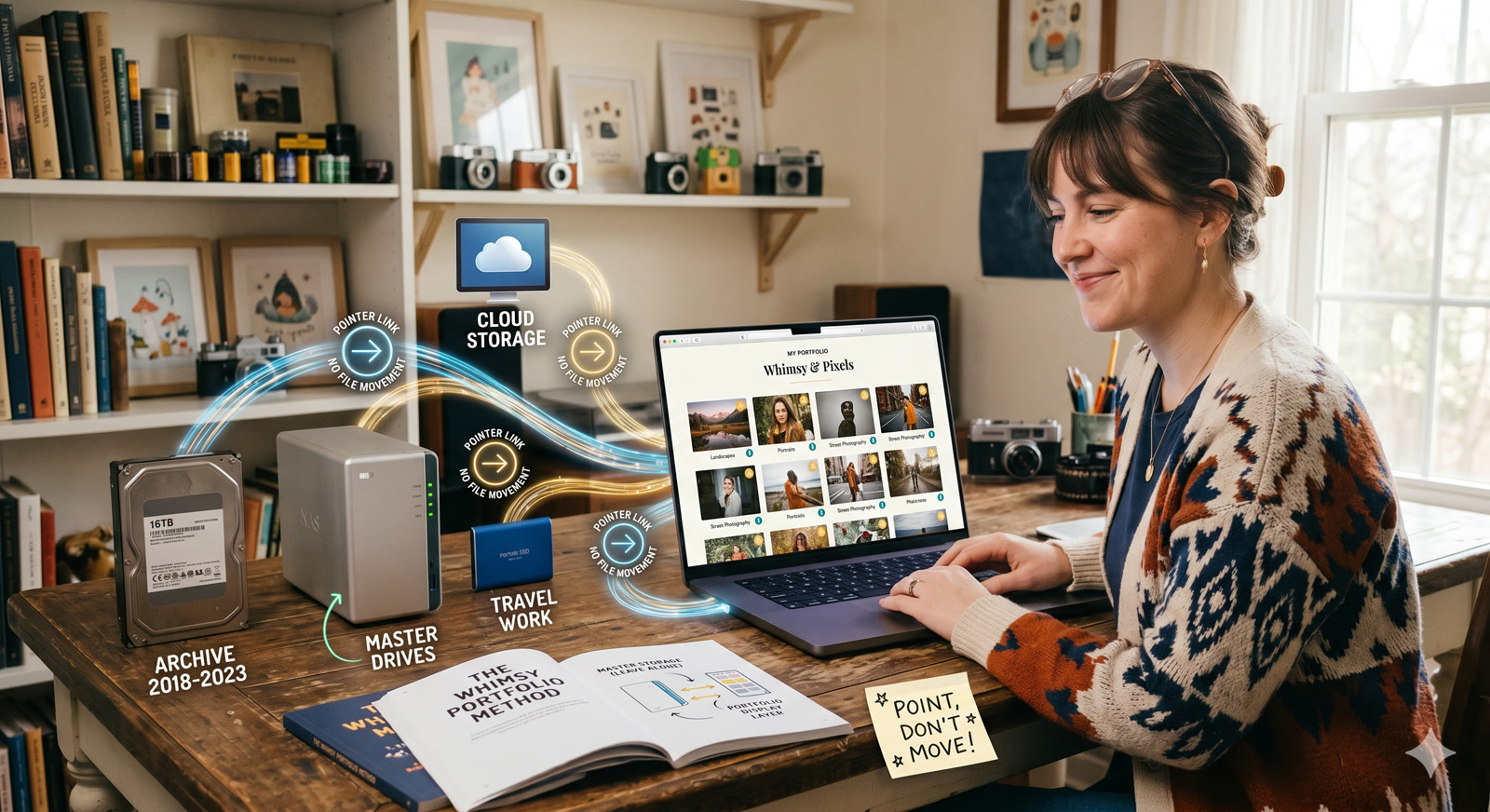
If you want a photography portfolio without moving your photos, the workflow should follow this framework:
- One source folder. A folder of final selects in Dropbox, Google Drive, or another storage location you already maintain.
- One presentation layer. The portfolio points at that folder instead of requiring you to upload a duplicate copy.
- One update habit. When the selects change, the presentation changes. You are updating the work once, not twice.
- One clear separation of jobs. Lightroom is for editing. Cloud storage is for keeping the files. The portfolio layer is for how the work is seen.
That last point matters. Photographers do not need another app that tries to become their editor, CRM, proofing suite, website builder, and storage provider all at once. Most of those all-in-one stacks solve one problem by creating three more.
The better approach is narrower. Keep the archive where it already is. Keep the editing workflow where it already is. Add a presentation layer that respects both.
That is the model we are building toward with Whimsy: your photos stay where they already live, and the portfolio points at them instead of asking you to rebuild the project somewhere else.
Dropbox vs. Google Drive as the source of truth
Either can work. The important part is not which cloud wins. The important part is that you pick one place that behaves like the truth.
Dropbox usually feels better when your workflow is already file-first. The folder structure is straightforward, desktop sync is familiar, and many photographers already use it for client handoffs.
Google Drive usually works better if your business already lives inside Google Workspace, or if you are collaborating with assistants, second shooters, or clients who already expect Drive links.
The mistake is not choosing the wrong provider. The mistake is trying to maintain two active truths at once. Pick the place where your finished selects already live most reliably, then make the portfolio follow that location.
If your deeper problem is not publishing but finding the right selects in the first place, the bigger bottleneck may be curation rather than portfolio design. That is the same problem we wrote about in When you’ve got 4,000 photos and need the right 30.
What stays in Lightroom and what belongs in the portfolio layer
Lightroom still owns editing. That means exposure, color, crop, retouching, export decisions, and all the fine-grained image work that shapes the final photo.
The portfolio layer should own entirely different problems:
- Choosing which finished images are visible
- Arranging them into a project or collection
- Presenting them cleanly on desktop and mobile
- Giving you a link you are proud to send
This is also why a portfolio should not force you into a new storage stack if you already have one that works. If your archive is split across clouds and drives, the bigger storage story matters too. We have written about that in DAM for Creators: Why the $7B Industry Still Doesn’t Serve You and Consolidate 3 Cloud Accounts Into One Dashboard. The portfolio issue is often just the public-facing symptom of a deeper file-sprawl problem.
Who this workflow is best for
This approach is especially useful if:
- Your best work already lives in cloud folders you trust.
- You update your selects a few times a year but avoid touching your website because the backend is tedious.
- You hate maintaining duplicate exports for the same project.
- You want something more polished than a shared folder, without taking on a full custom-site rebuild.
It is also a strong fit if your current portfolio is outdated mainly because the publishing workflow is annoying, not because you do not know what work belongs there.
The tradeoffs to be honest about
There is no magic here. “Without moving your photos” does not mean “without making decisions.”
You still need taste. You still need a real folder of final selects. You still need to decide what belongs in the portfolio and what should stay in the archive.
And if you want a completely custom marketing site with deep copywriting, sales pages, blog architecture, and a dozen conversion flows, that is a different job from a portfolio. A portfolio is a presentation layer for the work itself. It does not replace every part of your web presence.
But for many photographers, that is exactly the point. You do not need a giant website project. You need a clean way to show current work without creating another place for the files to rot.
Final recommendation
If your portfolio is outdated, do not start by shopping for prettier templates. Start by asking a harder question:
Why does updating the portfolio require moving the photos away from the place they already belong?
If the answer is “because the platform makes me,” that is the workflow to fix.
We think photographers should be able to build a portfolio from the folders they already maintain, without copying their work into a second silo just to make it presentable. That is the direction we are building toward with Whimsy.
Get early access to Whimsy
Whimsy is currently in early access. If you want a photography portfolio that points at the files you already manage instead of asking for another manual upload, tell us how you store your photos today.
Email [email protected]. We are opening portfolio mode in stages, and the people who reply now will directly shape the first release.
Frequently asked questions
Can I turn a regular Dropbox or Google Drive folder into a public website?
A shared folder can expose files, but it does not become a branded portfolio on its own. The workflow we are building in Whimsy adds a presentation layer that points at the folder you already maintain instead of asking you to move the files into another platform.
Does updating my source folder automatically update my live portfolio?
In a pointer-based portfolio workflow, that is the goal: the source folder stays the source of truth, and the presentation reflects changes there. Portfolio mode is still in staged early access, so we are validating the right sync and publishing behavior with early users now.
Will loading photos from cloud storage make my portfolio site slow?
Not if the presentation layer is designed properly. A portfolio should serve optimized web previews while leaving the original files where they are. That is the architecture we are building toward, precisely because photographers should not have to choose between speed and keeping their archive in place.
Do I need to upload my portfolio photos twice?
No. The whole point of this workflow is to avoid maintaining a second presentation copy of the same finished work. You keep one source of truth, and the portfolio should reflect that source instead of fighting it.
Comments (0)
The views in comments are those of the author and do not necessarily reflect the views of NumeraCode. We reserve the right to remove inappropriate content.